


 Get for Edge
Hosting
Which company hosts the site.
Monitor
Protect
Manage
By role
Security
Renewals
 Chrome & Edge extension
The Aepto Tech Stack Detector shows the hosting, CDN, server, CMS, nameservers, SSL and HTTP version of the site in your tab. Scanning is free and needs no account.
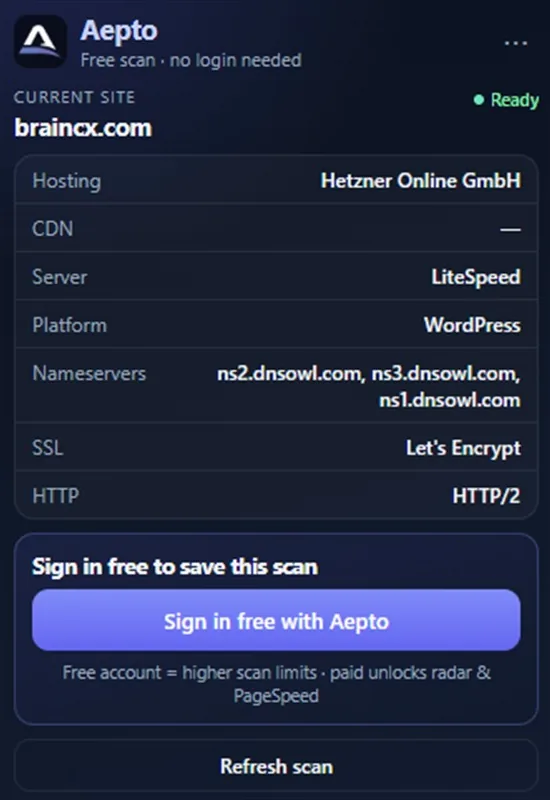
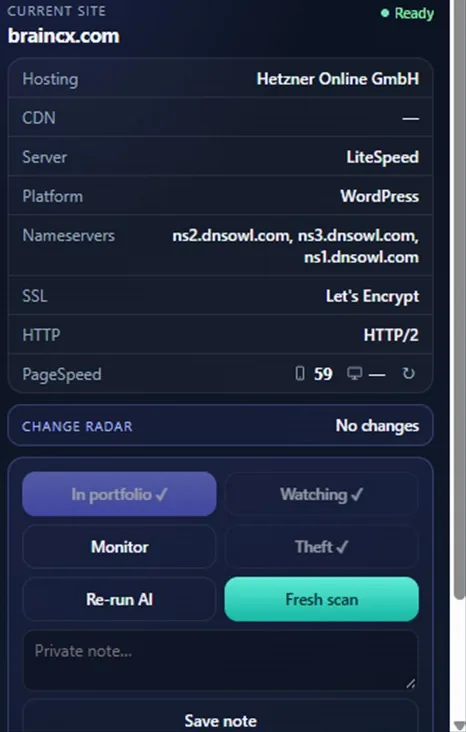
Seven rows read from public signals on the live page, plus a refresh.
Which company hosts the site.
The CDN in front of it, if there is one.
The web server software answering requests.
WordPress, or whichever platform the site runs on.
Where the domain’s DNS is hosted.
Who issued the certificate.
Whether it serves HTTP/2 or something older.
Re-read the site after a change.
These are public clues. Confirm anything important before you change hosting or DNS.
One click on any public site. About 24 seconds from the toolbar to the result.
Scanning stays free. An account is for keeping what you find.
| Feature | No account | Free account | Paid plan |
|---|---|---|---|
| Scan hosting, CDN, CMS, nameservers, SSL and HTTP | Yes | Yes | Yes |
| Higher scan limits | No | Yes | Yes |
| Keep a domain with "Add to my free account" | No | Yes | Yes |
| Add to portfolio, Watch, Monitor and Theft Guard from the popup | No | No | Paid plans |
| Change radar, PageSpeed and AI analyze | No | No | Paid plans |
Under a minute, and no account.
Add it from the Chrome Web Store or Microsoft Edge Add-ons, then pin the icon to your toolbar.
Open a public website, click the Aepto icon and read the stack rows.
Choose "Sign in free with Aepto" to add the domain to your account. Paid plans add Watch, Monitor and Theft Guard.
Check a prospect’s hosting and CMS before you speak to them.
Confirm the site landed on the CDN and host you were sold.
Compare two stacks without opening five lookup tools.
Add the domain to Aepto straight from the page you are on.
The extension, WordPress plugin and Claude connector share one account and one capacity level.
| Plan | Chrome & Edge | Domains | Price |
|---|---|---|---|
| Free | Basic | 3 | Free |
| Starter | Advanced | 10 | $9 a month |
| Professional | Advanced | 25 | $29 a month |
| Business | Advanced | 50 | $59 a month |
| Agency | Advanced | 150 | $129 a month |
| Enterprise | Custom | Custom | Custom |
Every limit is on Pricing.
No. Click the toolbar icon on any public site to see its hosting, CDN, server, CMS, nameservers, SSL and HTTP version. Scanning is free without signing in.
A free account lets you keep a domain with "Add to my free account" and gives higher scan limits. On paid plans the popup adds Add to portfolio, Watch, Monitor, Theft Guard, AI analyze and PageSpeed.
They are public clues read from the live page. Confirm anything important before you change hosting or DNS, and use Fresh scan after a site changes.
Google Chrome and Microsoft Edge. Install it from the Chrome Web Store or Microsoft Edge Add-ons, then pin the icon to your toolbar.
In Aepto, open your avatar menu, choose Connected apps and click Disconnect for the Chrome extension. You can also choose Disconnect from the extension menu.
No. Chrome and Edge help with stack detection and research while browsing. Cloud monitoring, Attention, and alerts live in the Aepto app.
Free to install. Free to scan. No account needed.
