


 What does Connect add?
Domain days left
A countdown to registration expiry, with the registrar shown.
Monitor
Protect
Manage
By role
Security
Renewals
 WordPress plugin
The Aepto Domain Expiry, SSL & DNS Monitor plugin runs free Domain Anchor checks on your site and emails you before a domain or certificate lapses. No account needed.
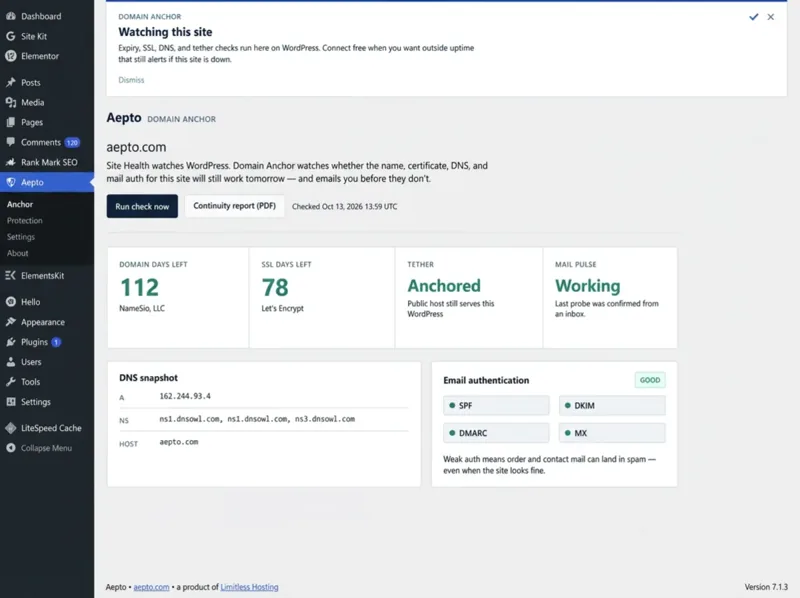
Run it from Aepto, then Anchor, with one click on "Run check now".
A countdown to registration expiry, with the registrar shown.
A countdown to certificate expiry, with the issuer shown.
Confirms the public host still serves this WordPress site.
The A record, nameservers and host at a glance.
SPF, DKIM, DMARC and MX graded, because weak auth sends mail to spam.
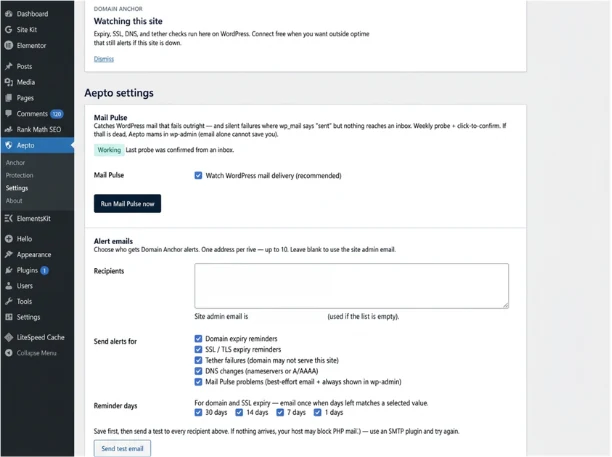
Catches WordPress mail that fails silently, with a weekly probe you confirm from an inbox.
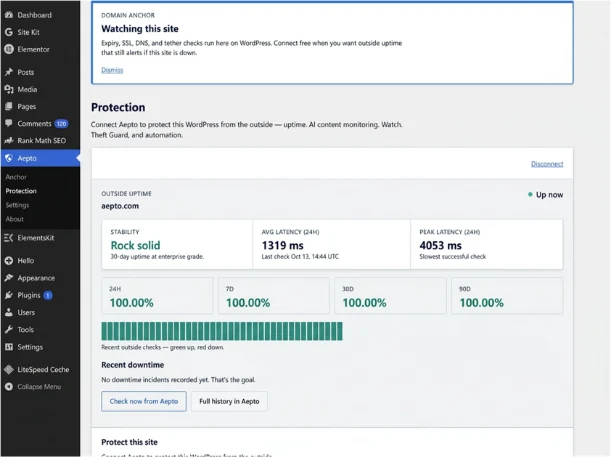
Domain Anchor works alone. Connecting a free Aepto account adds outside checks.
| Feature | Anchor only | After free Connect | Paid plan |
|---|---|---|---|
| Domain, SSL, DNS and email-authentication checks | Yes | Yes | Yes |
| Email alerts and the Continuity report (PDF) | Yes | Yes | Yes |
| Outside uptime and latency from Aepto | No | Yes | Yes |
| Add the domain to your Aepto portfolio | No | Yes | Yes |
| AI Content Monitoring, Domain Watch and Theft Guard | No | No | Paid plans |
Four steps. The last one is optional.
In WordPress go to Plugins, then Add New, search "Aepto Domain Expiry", click Install Now and then Activate.
Open Aepto, then Anchor, and click "Run check now" to see days left and the DNS snapshot.
Under Settings add recipients, pick alert types and reminder days, then send a test email.
From Protection, choose "Connect free with Aepto" to add outside uptime. Your site must be public over HTTPS.
Send clients a Continuity report (PDF) showing domain, SSL and email health.
Hear about an expiring domain or certificate before it takes the site down.
Catch silent mail failures and weak SPF, DKIM or DMARC before orders go missing.
The plugin, extension and Claude connector share one account and one capacity level.
| Plan | WordPress | Domains | Price |
|---|---|---|---|
| Free | Basic | 3 | Free |
| Starter | Advanced | 10 | $9 a month |
| Professional | Advanced | 25 | $29 a month |
| Business | Advanced | 50 | $59 a month |
| Agency | Advanced | 150 | $129 a month |
| Enterprise | Custom | Custom | Custom |
Every limit is on Pricing.
Short answers to what people ask before they start.
No. The plugin runs Domain Anchor on your WordPress site without an account: domain and SSL expiry, DNS, public-host and email authentication checks, with alerts by email.
Connecting free adds outside uptime from Aepto and lets you add the domain to your Aepto portfolio. On paid plans it also adds AI Content Monitoring, Domain Watch and Theft Guard from the Protection screen.
Connect needs a site that is publicly reachable over HTTPS. Localhost and plain HTTP fail by design, so connect from the production site.
Many hosts block PHP mail. Install an SMTP plugin, save your alert recipients under Aepto, then Settings, and send the test email again.
No. Disconnecting stops cloud sync only. Domain Anchor checks and email alerts keep working in wp-admin.
Free to install. Domain Anchor needs no account.
